Create a standout Orbytt profile and work portfolio that gets you hired (even with little to no experience)

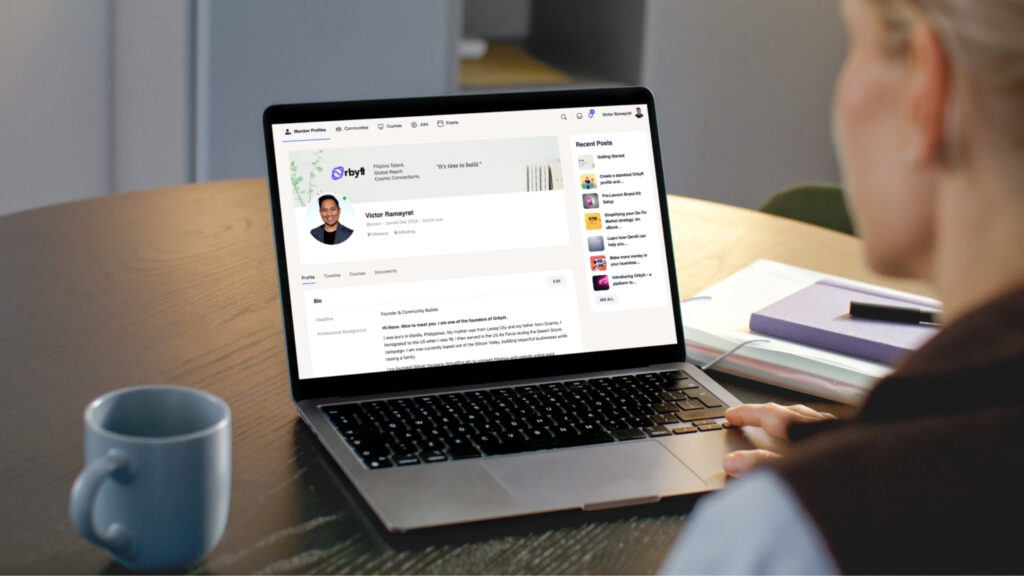
Create a standout Orbytt profile that gets you hired
TL;DR
- Profile Avatar/Headshot: Use a professional business headshot (critical)
- Content: Write to tell your story on how you provide VALUE to clients. Highlight your profile with keywords that are used in search. Keep it concise, only include relevant professional experience. Power tip: Try the search feature from the context of your client trying to search for your service. Does your profile show up on search results? If not, revise and update.
- Proof of Work: Prove that you are a high agency individual. Provide portfolio, commitment to work – proper equipment/secure workspace/internet, and testimonials.
- Timeline Activities: Post ideas, thoughts, and share resources on your timeline. Show your thought process and work ethic by being active in Communities.
Your Orbytt profile is not a résumé. It is a landing page.
Employers use Orbytt the way they use LinkedIn. They search by role, skills, tools, and outcomes. The profiles that appear first. And convert. Are the ones that are clear, specific, and proof driven.
This guide shows how to build a profile that surfaces in search and convinces employers to contact you.
1. Start with a role-first headline
Your headline is the most important field on your profile.
Do not write a vague title like “virtual assistant” or “freelancer.” Employers search with intent. Match that intent.
Use this structure:
Primary role + specialization + outcome
Example:
E-commerce virtual assistant | Shopify, Klaviyo, customer support | Reduced response time by 40%
This helps Orbytt search understand your profile and helps employers instantly know if you fit.
2. Write your summary like a value proposition
Your summary should answer one question fast. Why should an employer choose you.
Open with what you do best. Then support it with specifics.
Focus on:
- Who you help
- What problems you solve
- What tools you use
- What results you create
Avoid generic traits like hardworking or reliable. Employers assume those. They hire clarity and competence.
3. Optimize skills for search, not ego
Skills are not a wish list. They are search signals.
Only add skills you actively use and can defend in an interview. Prioritize:
- Role-specific skills
- Software and tools
- Industry terms employers actually search
Examples:
GHL, Apollo, Salesforce, HubSpot CRM, QuickBooks, social media scheduling, calendar management, lead qualification
Specific beats impressive every time.
4. Treat your portfolio like proof, not decoration
A strong profile explains. A great profile proves.
Include:
- Real work samples
- Short descriptions of the problem and outcome
- Metrics when possible
Even simple screenshots with context outperform long explanations.
If you do not have client work yet, create mock projects. Employers care about capability, not history.
5. Use experience descriptions that show impact
List responsibilities only if they lead to outcomes.
Instead of:
“Handled customer support emails”
Write:
“Managed 50 to 70 daily support tickets using Zendesk. Improved first response time and customer satisfaction scores.”
This turns tasks into trust.
6. Complete every relevant field, especially your profile avatar/headshot
Incomplete profiles rank lower and convert worse. Make sure that your photo is a professional headshot. The Orbytt algorithm will prioritize these headshots on search as well. Use this Canva template to size up your cover photo.
Fully completed profiles:
- Appear more often in search
- Signal professionalism
- Reduce friction for employers
If a field exists, it exists for a reason. Use it.
Fresh profiles perform better. So does activities on your timeline. You get what you put into Orbytt. Share your thoughts and ideas. It shows businesses you are active at work and your craft.
Update your profile and post an idea when you:
- Learn a new tool
- Finish a project
- Add a portfolio piece
Small updates compound visibility.
Your profile is your silent salesperson
Employers are actively looking. Your profile does the talking before you ever send a message. Make it searchable. Make it specific. Make it obvious why hiring you is the right decision.
A strong profile does not just get views. It gets conversations. And conversations get jobs.
Five steps to create a standout portfolio
Starting your journey as a Virtual Assistant (VA) is an exciting step toward building a flexible and rewarding career. But as a beginner, you might be wondering: How do I stand out when I don’t have much experience?
The answer lies in creating a standout VA portfolio that showcases your skills, professionalism, and potential. Even if you’re starting from scratch, a well-crafted portfolio can help you land your first clients and build credibility. Here’s how to do it!
Why do you need a VA portfolio?
A portfolio is your chance to make a great first impression. It’s a collection of work samples, skills, and achievements that demonstrate what you can do for your clients. Even if you don’t have prior VA experience, a portfolio allows you to:
- Showcase transferable skills from previous jobs, volunteer work, or personal projects.
- Highlight your professionalism and attention to detail.
- Build trust with potential clients by giving them a glimpse of your capabilities.
Think of your portfolio as your personal marketing tool—it’s your opportunity to prove that you’re the right person for the job, even as a beginner.
Step 1: Identify your transferable skills
You don’t need direct VA experience to create a portfolio. Start by identifying skills from your past roles that are relevant to virtual assistance. Here are some examples:
- Administrative Skills: Did you manage schedules, organize files, or handle emails in a previous job?
- Communication Skills: Have you written reports, handled customer inquiries, or coordinated with teams?
- Tech Skills: Are you proficient in tools like Microsoft Office, Google Workspace, or social media platforms?
- Creative Skills: Have you designed graphics, written content, or managed social media accounts?
Make a list of these skills and think about how they can translate into VA services. For example, if you’ve managed a team’s calendar, you can offer scheduling services as a VA.
Step 2: Create work samples
If you don’t have real-world examples to include in your portfolio, don’t worry—you can create your own! Here’s how:
Mock Projects:
- Create a sample social media calendar for a fictional business.
- Design a newsletter template using Canva or Mailchimp.
- Write a blog post or email sequence for a hypothetical client.
Personal Projects:
- If you’ve managed your own blog, social media account, or small business, include examples of your work.
- Showcase any volunteer work where you used relevant skills, such as organizing events or managing communications.
Skill Demonstrations:
- Record a short video tutorial on how to use a tool like Trello or Google Sheets.
- Create a step-by-step guide for a task you’re skilled at, like setting up a WordPress website.
The goal is to show potential clients what you’re capable of, even if the examples aren’t from paid work.
Step 3: Organize your portfolio
A well-organized portfolio is easy to navigate and highlights your best work. Here’s how to structure it:
- Introduction:
- Write a brief bio that introduces yourself, your skills, and your passion for helping clients.
- Include a professional photo to add a personal touch.
- Services Offered:
- List the VA services you provide, such as email management, social media management, or content creation.
- Work Samples:
- Group your samples by category (e.g., administrative, creative, technical).
- Add a short description for each sample, explaining the task and the skills used.
- Testimonials (Optional):
- If you’ve done any freelance work, volunteer projects, or internships, ask for testimonials to build credibility.
- Contact Information:
- Make it easy for clients to reach you by including your email, LinkedIn profile, or website link.
Step 4: Choose the right platform
Your portfolio needs to be easily accessible and visually appealing. Here are some platforms to consider:
- Canva: Create a visually stunning PDF portfolio or a one-page website.
- Google Sites: Build a simple, free website to showcase your work.
- LinkedIn: Use the “Featured” section to display your samples and projects.
- Use the Photos and Documents feature in your VirtualPro profile to upload images and PDFs of your work. Make sure your profile is complete with custom banner image.
Choose a platform that aligns with your skills and budget. If you’re tech-savvy, a custom website can make a great impression.
Step 5: Keep it updated
Your portfolio is a living document that should grow with your career. As you gain experience, add new samples, update your skills, and include testimonials from satisfied clients. Regularly refreshing your portfolio ensures it stays relevant and reflects your current abilities.
Final thoughts
Creating a standout VA portfolio is one of the most important steps in launching your virtual assistant business. Even without prior experience, you can showcase your transferable skills, create impressive samples, and present yourself as a professional ready to take on clients.
Remember, every successful VA started somewhere, your portfolio is the first step toward building a thriving career. So, take the time to craft a portfolio that reflects your unique strengths, and get ready to attract your first clients!